
Your couch called.
It has plans.

Your private playlists deserve a modern player. Live TV, movies and series, for less than the snacks. Your longest journey should be finding the remote.

  • Cinematic browsing, made for your remote.
  • Recommendations from your own library.
  • Buffer ahead. Save favorites. Resume.

M3U · Xtream Codes · BitTorrent Bring your own playlist.

Take a couch tour
LazyPlayer’s orange couch with teal cushions, a glowing play symbol and sleepy Z marks

The best seat.
For everything you love.

Scroll to move through movie night. Big-screen browsing, picks that learn your taste, and a little head start on buffering. Your couch can handle the rest.

Actual Android TV captures and illustrative feature visuals. Sample titles are fictional; no content or live playback is included.

Your library.
Its big-screen debut.

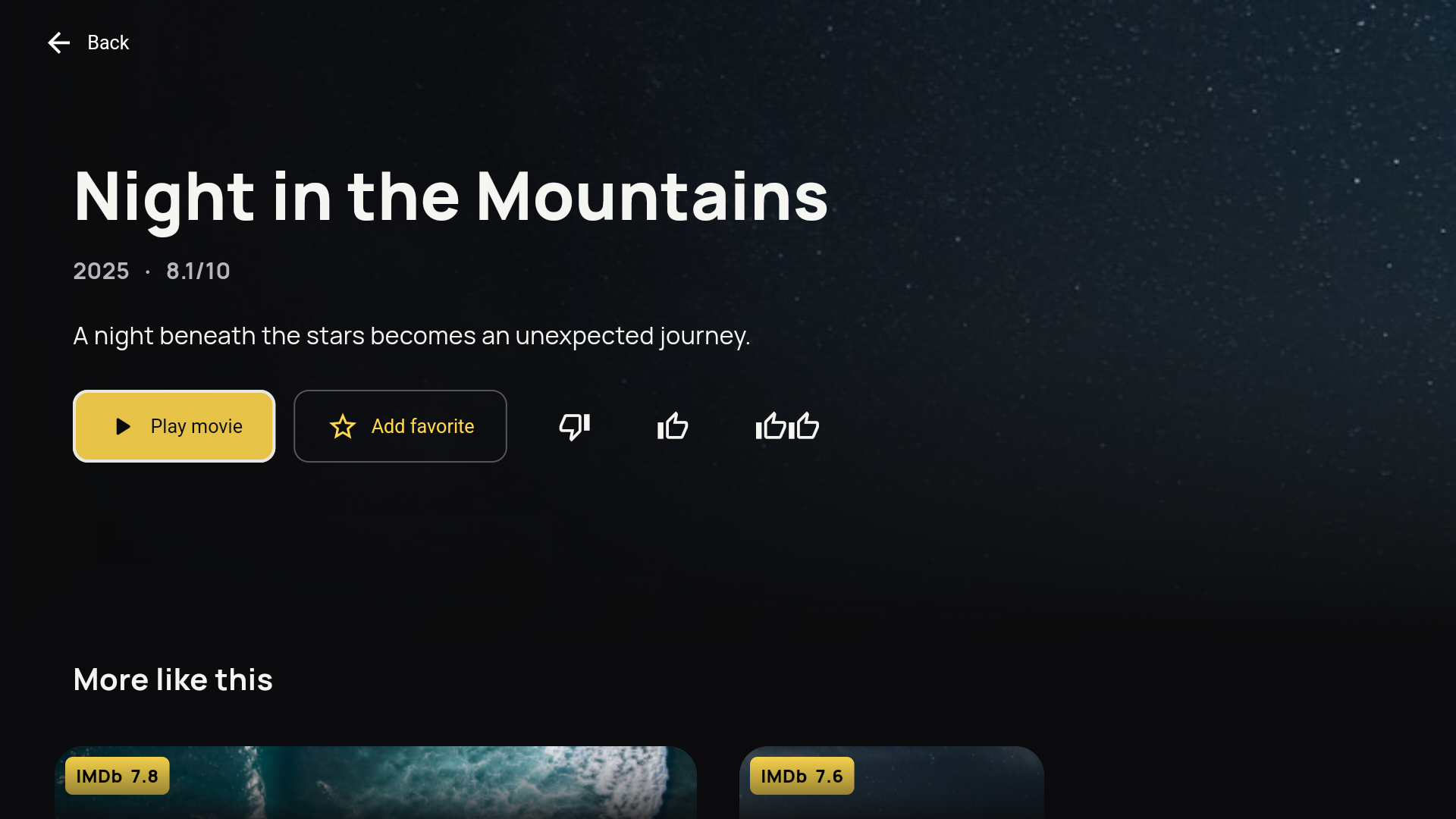
Cinematic artwork, generous poster shelves and a clear remote focus. Open a title, read the story, then return to the same place with Back.

  • Movies, series and live TV together
  • Favorites, search and unwatched filters
  • Language and quality variants, where available
Actual LazyPlayer Android TV poster shelves with fictional sample titlesActual Android TV title details with Play, favorite and rating actions
Actual Android TV design · sample library

Less “what now?”
More “that one.”

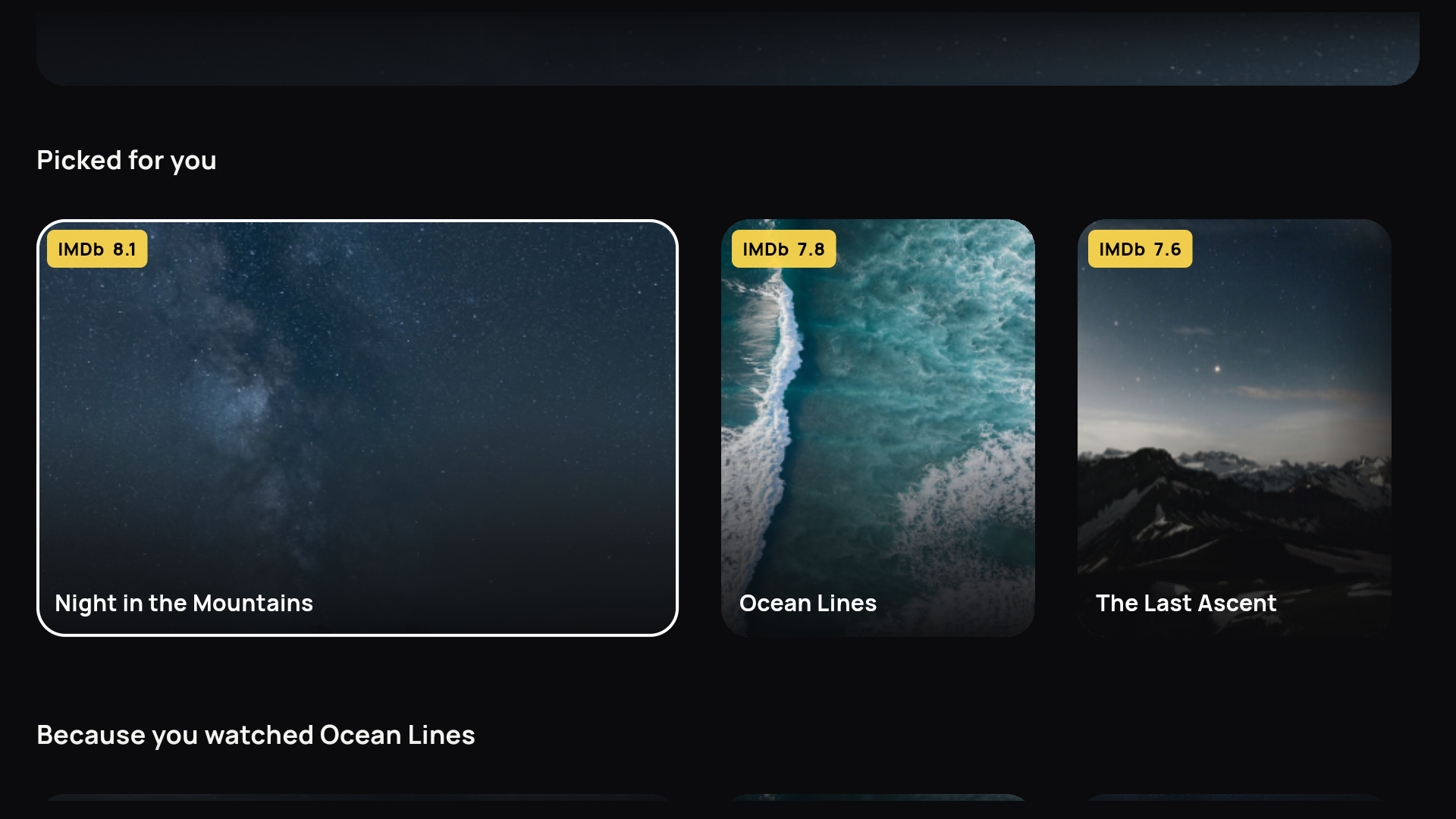
Your history, favorites and ratings help rank unwatched titles from your own playlists. Related shelves explain why a title caught your player’s eye.

  • Picked for you, from your available library
  • “Because you watched…” gives the context
  • Popular available titles help when you’re new

Enough history allows learned rankings to be evaluated. Suggestions need suitable titles; no specific pick is guaranteed.

Watched + rated + favoritesYour unwatched library
Summit sample artwork

Because you watched
Night in the Mountains

The Last AscentA little more adventure.
A lot less leaving the sofa.
Ocean sample artwork
Ocean LinesAnother available title in the sample library
Illustrative ranking · fictional titles

A little ahead.
Of the next hiccup.

Temporary buffering loads media ahead while you watch. That already-loaded portion can bridge a brief connection drop, until it runs out.

  • Auto or 15, 30 and 60-second targets
  • Longer live buffers add delay behind live TV
  • Adaptive quality needs provider renditions

Targets are not guaranteed coverage. This is not a saved offline download; long outages or slow streams can still interrupt playback.

Ocean artwork for the buffering illustrationThe story keeps moving.
Playing nowAlready loadedStill to load
Now30s ahead60s

A brief drop can use what’s already loaded.

Buffer illustration · 30-second target

“Just one more.”
Famous last words.

Seasons and episodes stay in order when your playlist supplies them. Continue where you stopped, skip an intro you’ve marked, or cancel the next-episode prompt.

  • Remembered movie and episode progress
  • Previous and next available episode
  • Manual or automatic intro skipping
Mountain sky artwork for a fictional seriesThe Art of
Doing Nothing
  1. S1 E1The remote is missingWatched
  2. S1 E2The blanket treatyContinue · 12:34
  3. S1 E3Snacks were a good ideaUp next
Fictional series · intro markers are set by you

Pause for snacks.
Stay for the plot.

Resume a supported movie or episode, or start again. Seeking, fullscreen and detected tracks stay within reach of your remote.

  • Audio languages and in-stream subtitles
  • Fit, crop and stretch picture options
  • HDR, Dolby and adaptive quality depend on stream and TV
Ocean artwork for a playback illustration
Ocean Lines

Your snack break.
Approved.

12:34
1:00:00

Some evenings deserve a slower pace.

English audioSubtitles availableResume your place
Playback illustration · no video playing

A tidy library.
An untidy sofa.

Saved playlists keep their own favorites and history. Switch sources from your remembered phone dashboard, without wrestling the TV keyboard.

  • M3U, Xtream and magnet/.torrent URLs
  • Refresh schedules, cancellation and saved-library recovery
  • Hide titles, reorder and correct artwork

Removing a source or clearing history asks for confirmation. TV density controls adjust browsing to your screen.

Your evening.
Your playlists.
M3U
Weekend favorites

On your TV · favorites and history saved

XC
Evening Xtream

A separate saved source

BT
BitTorrent films

Magnet or .torrent URL

Playlist illustration · your real sources are unchanged
Move. Open. Back.Your thumb knows the way.
Remote-first controls, without a manual.

Let your remote
get the exercise.

Your remote should feel familiar. Browse posters, search your own library and get back to the title you were watching.

A remote that feels natural.

Visible focus follows your D-pad. Back closes what you opened and returns you to the title you were browsing.

Find the title, skip the scrolling.

Search titles or browse original provider categories. Save favorites and find unwatched titles without starting your search over.

Your place, saved.

Continue supported movies and episodes from where you left off, or start from the beginning. Your watch history stays with its playlist.

Your series, in order.

Browse seasons and episodes when your playlist provides them. Continue a series and move to the next available episode from the player.

Watch the way you want.

Pause, seek and go fullscreen. Choose detected audio or subtitle tracks when the stream and device support them. Temporary buffering loads media ahead while you watch.

One TV. Two simple plans.

90 days free, no card needed. Then $1 a month or $3 for a whole year. Both renew automatically until you cancel. USD, per TV. Your private playlists; no content included.

Stay for a little while.

Monthly subscription

$1per month

Small price. Modern player. Big couch energy.

  • Renews monthly. Cancel anytime
  • Same player features
  • One TV per license
Subscribe for $1/month

Less “what now?”
More “that one.”

As your household watches and rates titles, LazyPlayer can surface unwatched movies and series from your playlists.

A good movie nightWatched · saved · rated
More adventureSomething relatedA fresh discovery
Suggestions follow your taste, within your own playlists.

Picked for you

Watch history, favorites and ratings help rank titles from your own library. Suggestions stay within the titles your playlists make available.

Because you watched...

Related shelves show why a title is suggested, so you can follow a good find without starting a new search.

Useful from the start

With little viewing history, available popular titles can fill the gap. Suggestions appear only when your playlists contain suitable titles.

Channel surfing.
Zero actual surfing.

Browse channels and provider categories beside a live preview. Switch channels with your remote while keeping the guide close.

Connect your TV

Now, and what’s next.

Add an XMLTV guide to see current and upcoming programmes where listings match your channels.

Your favorite channels, closer.

Save favorites, search by name and return to the channel you were browsing.

Keep the evening moving.

Remote controls stay close to playback. If a stream fails, retry or return to your library.

A guide that stays beside your previewFictional XMLTV example · 19:30
01
Weekend SportsNow · The slowest race
Next · Highlights
02
Nature TimeNow · Sloths, obviously
Next · Ocean life

Channel names and listings come from your source. These examples are fictional.

Bring the playlists
you already have.

Connect once. Switch between saved playlists whenever you like.

M3U

M3U playlists

Paste your playlist URL. Live channels, movies and series are organized from the information your source provides.

XC

Xtream Codes

Enter your server address, username and password. Keep long provider details on your phone, away from the TV keyboard.

BT

BitTorrent

Paste a magnet link or a .torrent URL to add its video files to Movies. Availability depends on the source and peers.

Your phone is the easy remote.

Scan once to open your remembered dashboard. Add, switch, refresh or remove playlists; hide titles, change their order and update artwork. Each playlist keeps its own favorites and history.

Manage playlists

Long passwords.
Short setup.

Scan the QR code on your TV. Your browser remembers you, so managing playlists is easy the next time too.

  1. Scan the TV code

    Open LazyPlayer on your TV and scan its QR code with your phone. You can also open the shown link manually.

  2. Connect your source

    Paste an M3U URL or magnet/.torrent URL, or enter your Xtream details. The TV shows import progress.

  3. Start watching

    When import finishes, select Start watching on the TV. Browse your library with the remote.

Bring your own playlist. LazyPlayer is a player, not a content subscription. It does not supply channels, movies, series or playlists. Add a playlist you are authorized to use; content availability comes from that source.

An IPTV player built for TV

Android TV is our first platform, Samsung Tizen our second. Check availability for your device before buying a license.

Browse with your remote.

An IPTV player for Android TV, with M3U, Xtream and BitTorrent sources, live channels and movie posters. Check availability for your model.

Check compatibility

Made for the big screen.

Our IPTV player for Samsung TV is in development and device testing. Availability depends on your model.

Check availability

Before you press play

What is an IPTV playlist player?

An IPTV playlist player opens the live TV and on-demand streams in a playlist you provide. LazyPlayer supports M3U URLs, Xtream Codes and BitTorrent magnet/.torrent URLs, with remote navigation, movie posters, search and favorites. It does not sell or provide content.

Are channels, movies or series included?

No. LazyPlayer does not include channels, movies, series, guide data or a content subscription. Everything you watch comes from a playlist you are authorized to use.

Which TVs can I use with LazyPlayer?

Android TV is the first platform; Samsung Tizen is the second and remains in development and device testing. Availability and playback support depend on the device. Contact support with your TV model before purchasing. Each TV needs its own license.

Can I use my playlist when switching from TiviMate or IPTV Smarters?

If your provider gives you an M3U playlist URL or Xtream Codes details, you can add them to LazyPlayer. Your previous player’s license, settings and viewing history do not transfer. Check device availability and try your playlist during the demo before deciding.

How much is the player subscription?

The player costs $1 per month or $3 per year in USD, per TV. Payments recur automatically until you cancel in your dashboard or PayPal. Cancelling keeps access through the paid period. Both plans cover the app only; content-provider charges are separate. Existing lifetime licenses stay valid.

How does the 90-day free demo work?

The player runs free for 90 days per TV. After the demo, choose a $1 monthly or $3 yearly recurring subscription to keep that TV unlocked. The demo does not start automatic payments; you must approve a subscription. You need your own playlist during the demo too.

Will changing players stop buffering?

Buffering depends on your stream source, connection and TV. LazyPlayer cannot guarantee buffer-free playback or increase the frame rate of the source. Try your streams on your device during the demo.

How do I get help with setup or compatibility?

Email support@lazyplayer.app with your TV model and a description of the issue. Do not send playlist passwords or private stream links.

1 LazyPlayer is a player only. It ships with no channels, movies, series, EPG data, or subscriptions and provides no content. App captures show the Android TV emulator with fictional sample titles and bundled sample artwork. These titles are not included with the app.